Lead forwarding — centralized or individual
Choose which network credentials are used to forward your team's leads — a single member's (centralized) or those of whoever the lead is assigned to (individual).
Updated on June 9, 2026
Every time a lead is forwarded to an external network, RoyLead needs to know which credentials (the network's uid/key) to use to deliver it. The forwarding mode decides this: either it always uses one person's credentials, or those of the member the lead is assigned to. It's a team-level setting, not a per-lead one.
Open your team and go to the Lead Forwarding tab:
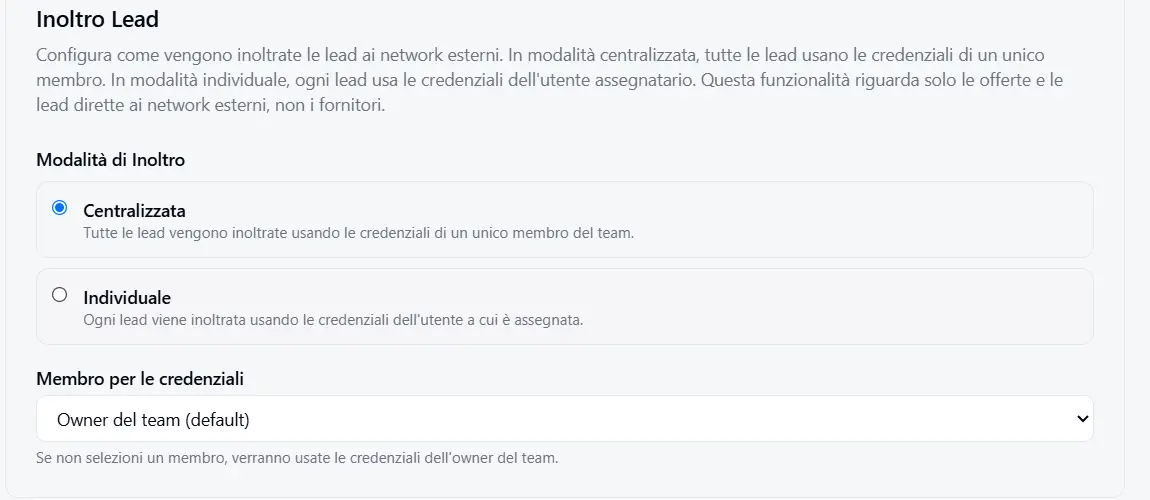
📌 The tab only appears for Media Buyer teams and can only be changed by the team owner and admins. Operators don't see it.
Centralized mode
All of the team's leads are forwarded using the network credentials of a single member you choose (the team owner by default).
In practice: it doesn't matter who generated the lead or who it's assigned to — it always reaches the network from the same account. This is the default mode and the right one when a single person manages the relationship with the network on behalf of the whole team.
- You pick the member in the "Member for credentials" dropdown.
- If you don't pick anyone, the owner's credentials are used.
- Only that person needs to have the network credentials set up.
💡 Tip: if you work solo or share a single network account, keep Centralized mode. It's the simplest and doesn't require every member to configure their own credentials.
Individual mode
Each lead is forwarded using the credentials of the member it's assigned to. Marco's leads go out from Marco's account, Anna's from Anna's account.
This is the right mode when each media buyer has their own account on the network (their own uid/key) and must deliver leads under their own name.
⚠️ In Individual mode every assignee must have their own network credentials configured. If a member doesn't, their leads can't be forwarded and end up in the Error status. The tab shows an amber warning listing the members still missing credentials.
What happens when something fails
The mode also changes what happens if credentials stop working:
| Centralized | Individual | |
|---|---|---|
| Which account leads go out from | Always the same (chosen member / owner) | The assignee's |
| Who needs credentials | Only the chosen member (or owner) | Every member who receives leads |
| If credentials fail | All leads fail the same way | Only that member's leads fail, the others go through |
Traceability
For every forwarded lead, RoyLead stores which credentials it went out with (member and mode). So even if you change the setting later, you always keep the history of how each lead was actually delivered.
In short
💡 One network account → Centralized. Each media buyer with their own account → Individual (and make sure everyone has set up their credentials).
Each member's credentials are configured in their Settings → Network. Once they're in place, the forwarding mode simply decides which ones to use.
Ready to put this into practice?
Create your RoyLead account and start in minutes.