How the Cost Cap works (spending ceiling)
The most you can pay in ads per lead and stay profitable, computed from lead value × approval rate × ROI. Works for both network and supplier offers.
Updated on June 19, 2026
The Cost Cap is the most you can pay in ads for each lead while staying profitable. RoyLead computes it for you on every offer, so you instantly know whether you're overspending or still have room to scale.
What it's for
When you run campaigns the question is always the same: "how far can I push spend without losing money?". The Cost Cap answers with a precise ceiling and compares it to what you're actually paying (your CPA), showing a traffic light — green / yellow / red.
How it's calculated
The core logic is simple:
Cap = lead value × approval rate ÷ (1 + target ROI)
Three ingredients:
- Lead value — what you earn when a lead converts.
- Approval rate — how many leads, on average, actually convert.
- Target ROI — the margin you want to keep (e.g. 30% =
0.30).
💡 In plain words: take what a lead is worth, "scale" it by how many actually convert, then keep the profit margin you decided on. What's left is the most you can pay in ads per lead.
Why "× approval rate"
This is the key point. Not every lead pays. You pay for ads on every lead you generate, but you only earn on the approved (or delivered) ones. So the value has to be "diluted" by the approval rate.
Example: a lead is worth €20, but only 1 in 2 converts (50% approval) → the average value per generated lead is €10, not €20. The cap starts there.
External network vs Supplier
The cap works the same way for both — only value and rate change.
External network offers
- Lead value = the payout the network pays you per approved lead.
- Rate = the network approval rate (paid leads ÷ judged leads).
No product or shipping here: you earn a fixed payout, simple.
Supplier offers (COD lots)
- Lead value = the net margin = sale price − VAT − product cost − shipping.
- Rate = the delivery rate (orders earn on delivery, not on a network verdict).
- The AI confirmation-call cost is also subtracted (when you use it).
💳 What's in and what's out (supplier offers) In: product cost, VAT, shipping, AI call cost — the direct costs of that order. Out: media-buyer commission (it's a profit split, not a product cost) and fixed costs (rent, utilities). Ad spend is NOT subtracted: it's exactly what the cap computes.
The traffic light: are you spending well?
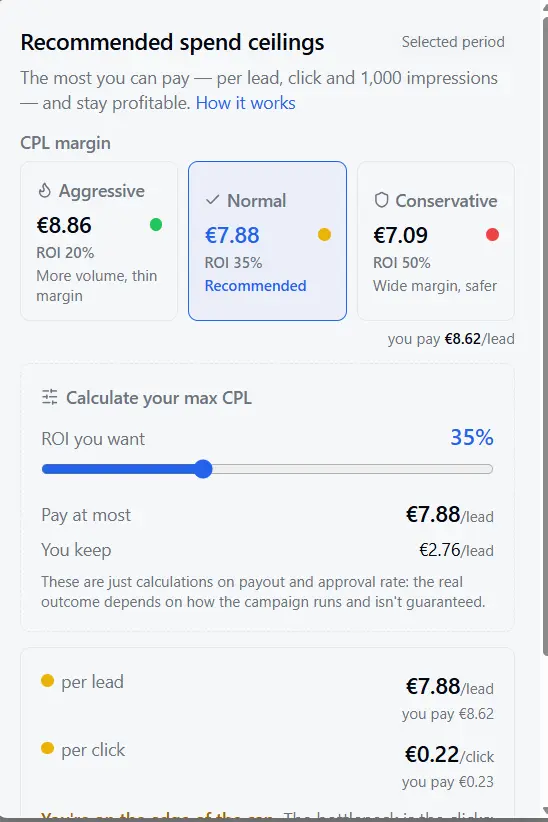
RoyLead compares your real CPA (spend ÷ leads) to the cap:
- 🟢 Green — you pay below the ceiling: profitable, room to scale.
- 🟡 Yellow — close to the limit: watch out.
- 🔴 Red — you pay above the ceiling: those leads are eroding your margin.
Scenarios and adjustable ROI
Each cap shows three ready presets — Aggressive, Normal, Conservative — matching three target-ROI levels. Normal is the default recommendation. With the ROI slider you can raise or lower the margin you want to keep and watch the ceiling move in real time.
📌 The cap self-tunes: with few leads it leans on a benchmark; as outcomes accumulate, your real rate takes over. More data = a sharper estimate.
Quantity (1x / 2x / 3x) — suppliers only
On supplier offers the margin used in the cap is the weighted average over the real mix of sold quantities (1, 2 or 3 units): if you often sell multi-unit orders, the ceiling accounts for it instead of stopping at a single unit.
Where to find it
- On supplier and external network offers, next to each offer.
- In the per-offer / per-landing analytics detail.
Ready to put this into practice?
Create your RoyLead account and start in minutes.