Set up your Worldfilia offers
Connect Worldfilia to RoyLead — save your credentials, enable status postbacks and create the offer with its API URL to forward leads automatically.
Updated on June 24, 2026
Worldfilia is natively integrated in RoyLead: once you've saved your credentials and created the offer, every lead collected on your landing page is forwarded to Worldfilia automatically, and status updates (approved / cancelled / duplicate) come back on their own.
💡 The full loop is always this: 1) save your credentials → 2) enable status postbacks → 3) create the offer with its API URL → 4) link it to your landing pages.
Before you start
You need, from your Worldfilia panel (portal.worldfilia.net):
- Your API Key and your Source ID (you'll find them in the offer's API window — see below).
- The API URL of each offer you want to promote — it's the offer's specific endpoint, not just an ID.
📌 Worldfilia gives you these values, not RoyLead. If you can't find them, ask your Worldfilia manager.
💳 Worldfilia pays in EUR: in the offer the payout is preset to EUR.
Where to find API Key, Source ID and API URL
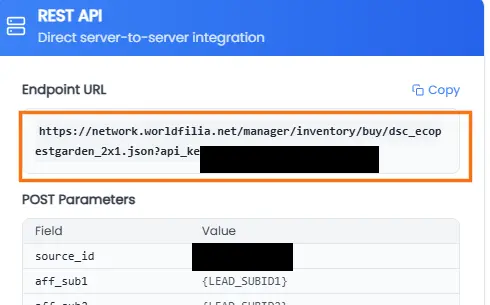
All three values are in the same window. On the Worldfilia panel open an offer's API documentation:
- API URL → it's the Endpoint URL: copy it in full (you'll paste it in the API URL field in Step 3).
- API Key → it's inside the Endpoint URL, after
?api_key=(for Step 1). - Source ID → in the POST Parameters table, the
source_idrow (for Step 1).
Save your credentials
- Go to Settings → Network Credentials.
- Open the Worldfilia card and fill in API Key and Source ID.
- Click Save credentials: the green Credentials saved badge appears.
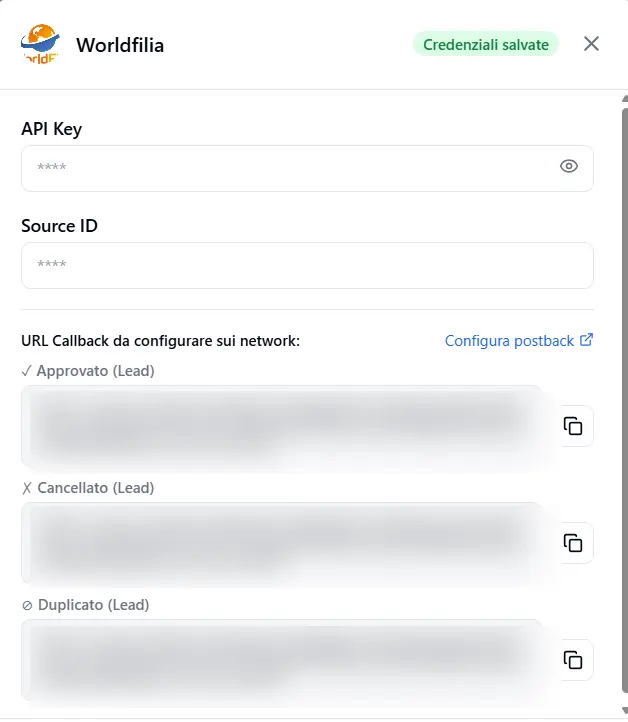
🔒 Credentials are saved per team and reused by all Worldfilia offers: you enter them only once.
Enable status postbacks
Worldfilia reports the outcome of each order by calling RoyLead back. There's a dedicated URL for each status.
- Still in Network Credentials, generate/copy the Webhook Token.
- Under the Worldfilia card, RoyLead shows you three callback URLs ready to use (with the token and the lead-id placeholder): Approved ✓, Cancelled ✗, Duplicate ⊘.
- Open the Worldfilia panel (there's a «Configure on network» link next to the URLs) and paste each URL in the matching status field.
💡 Leave the lead-id placeholder (
[[subid2]]) as it is: Worldfilia replaces it on its own. Without postback, leads are still forwarded but stay «pending».
Create the offer
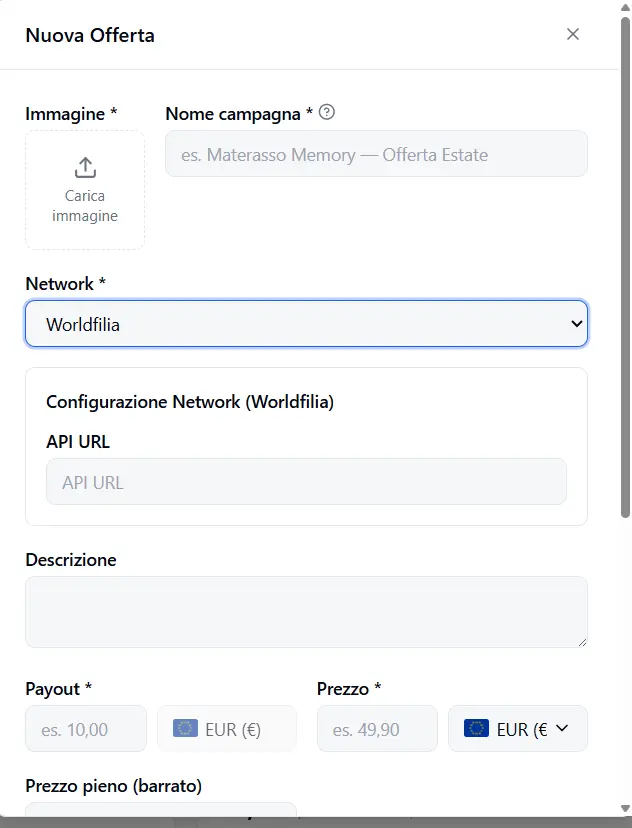
- Go to Offers and click New Offer.
- Image and Name — the offer's identity.
- Network — pick Worldfilia from the menu. The Network Configuration appears below.
- API URL — paste the offer's API URL taken from the Worldfilia panel.
- Payout — what you earn per valid lead, in EUR (preselected).
- Price + Currency — the product price for the customer, in the offer's local currency.
- Daily cap / Total cap, Duplicate window, Target countries, Offer URL — as for any offer.
- Save.
Link the offer to your landing pages
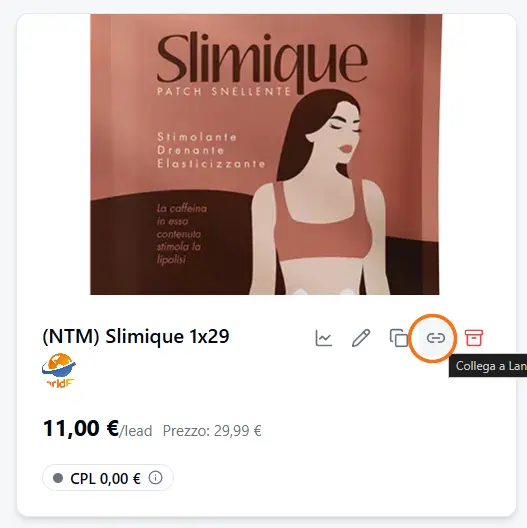
In the Offers list, on the offer card click the chain icon («Link to Landing») and choose the landing pages to link: from then on, every lead collected on those landings is forwarded to that Worldfilia offer.
Check
- Publish a landing page linked to the Worldfilia offer.
- Send a test lead from the form.
- In RoyLead → Leads the lead should move to Forwarded; when Worldfilia processes it, the status updates on its own thanks to the postbacks from Step 2.
💡 Status stuck on «pending»? Double-check the three callback URLs (Step 2) are pasted in the right fields of the Worldfilia panel, with the placeholder intact.
Ready to put this into practice?
Create your RoyLead account and start in minutes.